Dev Log 4 - Automated video game testing
Hi I’m AceOfSpider of Buy Me A Drink First games and this week I’ll be explaining how I test my latest video game, Relics of Kenfurm.
So why bother automating tests in the first place since humans are needed to test it anyway, isn’t it just a waste of time to create and maintain tests? While initially yes, it pays off in the long run as you spend less time fixing the same issue over and over again. If I create a test that checks when the player hits a tree, it breaks and they get a log, then knowing that that test passes gives me confidence that I haven’t broken any of the system involved in that process and means that I don’t have to manually play the game to find a tree, hit it and check my inventory.
It takes just 2 seconds to check that mechanic rather than 30 seconds of manual testing to establish the same thing. But more than that, is that all the tests are running in parallel. In that same 2 seconds of checking that you can get a log from a tree, it’s also checking things like door unlocks, wall collisions, enemy behaviours, stuff like that. When it comes to just testing the core mechanics of the game… this is the way.
I am a software developer by day, we use testing everywhere to validate things are working at the function level but also at the integration level. I take inspiration for game play testing from Factorio, Sea of Thieves and Minecraft.
Starting with Factorio, they have something that is inspiring to watch, they have a wide suite of tests that run across multiple virtual machines, every time they push a build. Tests ranging from building, processing, combat, power and path finding. It is truly hypnotic to watch the videos of their test cycles running. Watch the test run here https://www.youtube.com/watch?v=CgMV2dFFdFE
Sea of Thieves had a challenge of testing in 3d. They came up with a solution that allows them to test each of their game mechanics in isolation allowing for regression prevention. Here is where they are testing the player turning the wheel of a ship as part of their GDC talk in 2019 https://www.youtube.com/watch?v=X673tOi8pU8&t=3575s
Minecraft, I only recently learnt of how they are testing. Their game being complex by the nature of it’s design, they have a lot of tests which all run in a single world all at the same time. Here is a talk about their testing system https://www.youtube.com/watch?v=vXaWOJTCYNg&t=1135s
From the video I watched I took away that tests in video games should be:
- Easy to write, read and run
- No manual setup to run these tests
- Each test should be isolated from each other
- Quiet on success and verbose on failure
- Visible when there is an error
- Scalable on creation and execution
So in deciding to add tests to my Game, how do we do it? There is a GameMaker Testing Library however my understanding of this is slim as there is a lack of documentation and videos on the subject, as far as I can see this would only test units or individual functions. As I try to design my games with reusable systems this is good but what I’d prefer is to test that elements within the game are interacting as expected. For example, instead of testing that damage to object lowers it’s hp, that a drop script returns an item to be dropped, that a dropped item targets a player that is close and that a dropped item which collides can be added to an inventory. I’d rather simulate it in engine; player hits object, item dropped, item picked up and added to inventory. This is sort of like integration testing, whereby you are checking that multiple systems are working correctly together out in the wild. There are extensions on the GameMaker marketplace that claim to do this, I have tried a few but I don’t feel comfortable trusting a 3rd party add-on that could break in a future release.
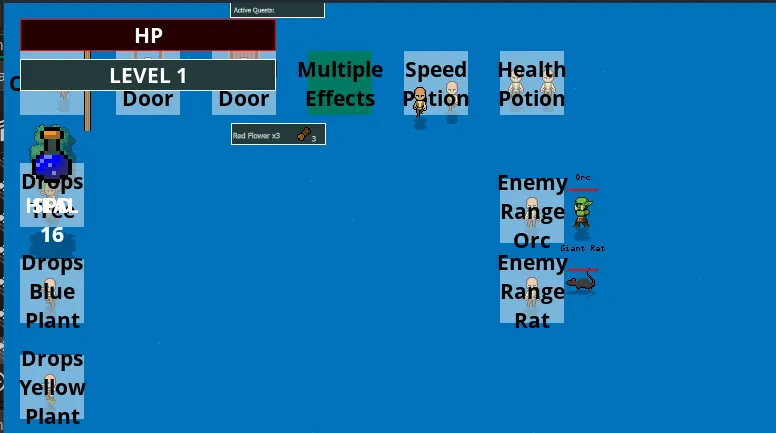
So I have created a separate config within GameMaker that only runs the tests. It can be run by a developer or via command line. I created a test object as an instance in the test world.
These tests are structured similar to Unit tests; Arrange, Act, Assert. If we take the example of testing destructible objects like a tree.
- Arrange - on test object creation a player is created and a tree is created next to the player. The tree is created with a hp of 1 to keep the test quick.
- Act - the player is set to attack mode and begins hitting the tree, which after one hit drops a piece of wood. A timer or an alarm is set for 2 seconds. This gives enough time for the drop to be picked up by the player.
- Assert - when the alarm triggers the test object checks that the player object has at least 1 piece of wood in it’s inventory. If this is the case the test passes, a console message is logged and the test object goes green to visually indicate that it has passed. If it fails an error message is displayed with additional information relevant to the test that could be helpful, the test goes red and if running from command line the test will crash the game to fail a build pipeline
I am also taking advantage of input variables so that I can pass parameters like instead of tree and wood, it could be plant and flower, to check other instances. With this type of structure, I have confidence that regression issues have been reduced, and considering the amount of cross platform issues that have experienced with GameMaker, I can run these tests on multiple platforms at the same time to check consistency.
My next steps for testing aim to address other issues and crashes I have come across:
- Crashes when loading certain worlds
- Crashes when loading UIs
- Path-finding around the worlds
- Quest logic
At this time I am running these tests manually and they have already caught many issues. The gold standard would be to attach it to my build pipeline (if you haven’t heard my previous devlog on how I automatically build and push my game to Itch.io, I recommend giving it a listen.) My plan is that running these tests as part of the build process will stop any builds being pushed with obvious issues. However at this time even with the help of the GameMaker community forums I have been unable to get this functioning. GameMaker has released a new CLI and based on feedback to a GitHub issue I raised, testing with configs may be coming in the next release. So hopefully I can achieve this automation.
Thanks for listening, see you in the next one.
~AceOfSpider
Want early access and bonus content?
You can get early access, staging builds, behind the scenes content and support our work, by heading on over to our Patreon
- In-Game Credits
- Access to Staging Builds
- Early access to audio devlogs
- Version Archive
- Credits in Posts on Itch
- Includes Discord benefits