Dev Log 8 - Slider Overdrive
Hi I’m AceOfSpider from Buy Me A Drink First and here is another audio dev log. This week I’m talking about something in most games that you’ve interacted with but never thought about, something that has caused me a mini bit of chaos.
When you think about game dev, your mind usually darts to the joy of making mechanics, or the creativity of the art work…you know things that make a game fun and interesting. However there are systems that lurk in the shadows; the ones no one is eager to work on, but is a must for usability.
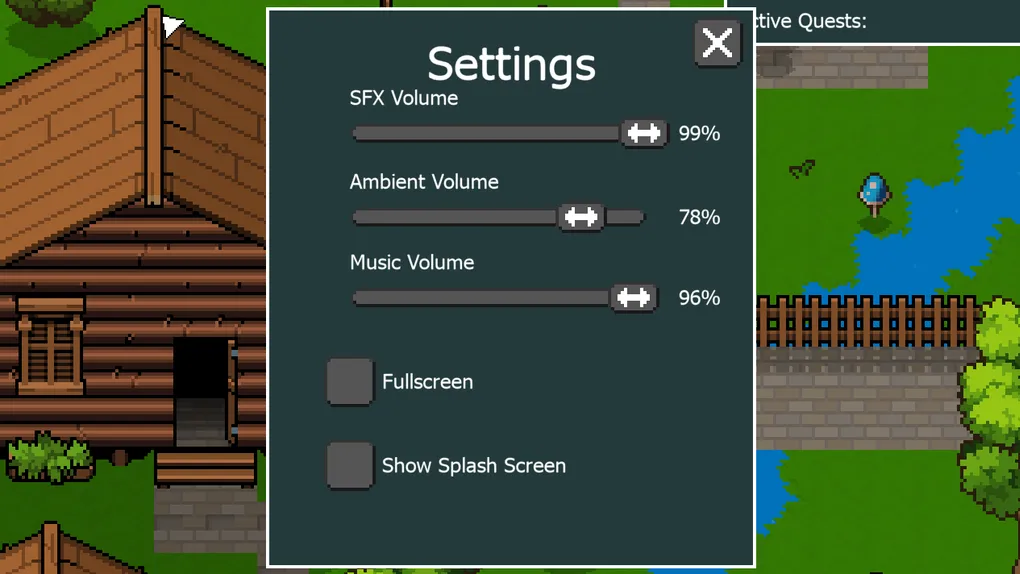
Something in most games you’ve never considered, you’ve just mindlessly used it and not given it any much more thought…the volume sliders. Should be simple to implement right, it’s a drop in component surely. Nothing in game development is a drop in component, you build everything or it doesn’t exist. In game maker there are UI layers; you can drag and drop and declare how things should scale. If you want interactivity then you’d put objects on these layers.
How do we build a settings slider?
- A bar that spans the length of the panel
- A dial that you can drag along the bar
- Some text to explain what the slider is manipulating and it’s current value
- Next make it so that dial can be dragged, when the mouse button is pressed down on it but not before it’s released, but it could be released at any point and also make it jump to a position on the slider bar if clicked
As for making it actually do something, you need to get the volume percentage based on the dial’s relative position across the bar. But again making sure that the dial cannot move beyond the boundaries of the bar (we don’t want dials flying loose all over the place). Also making the slider on load show the current volume by reversing the position calculation. Then apply this to actually control the volume of sound effects, ambient and music tracks.
One of the major walls I hit with this on is the inconsistent cross-platform behaviour Gamemaker has to do with mouse positioning. See when I originally made this system I was quite happy with it, as it worked…on Linux. When the staging build went up the following wednesday, I tested it on Itch.io, the dials weren’t showing and clicking on the dial set it to 100%. But what was worse was the volumes of everything went into overdrive. Turns out that getting the position of the mouse is differently scaled in web, and what I thought was 81% volume was actually 8100% volume…my ear drums didn’t thank me and my headphones are feeling sorry for themselves.
Anyway fixed it by using device_mouse_x_to_gui(0) and I have added a fail-safe to prevent injury to future players. So the next time you touch that slider, spare a thought for the developer who may have damaged their ears in making it.
Thank you for listening, see you in the next one.
~AceOfSpider
Want early access and bonus content?
You can get early access, staging builds, behind the scenes content and support our work, by heading on over to our Patreon
- In-Game Credits
- Access to Staging Builds
- Early access to audio devlogs
- Version Archive
- Credits in Posts on Itch
- Includes Discord benefits